Waypoint converter, NGS standards, Lat/Long to Northing/Easting)
The Coordinate Converter by GIStract offers a free, instant solution for both single-point and bulk CSV conversions. Our platform is a specialized NGS conversion tool that supports seamless transformation between WGS84 (Latitude and Longitude) and UTM (Northing and Easting) systems. With live map visualization and Waypoint converter capabilities, we ensure engineering precision for all your geographic data needs—100% private, no registration, and processed directly in your browser.
Precision Coordinate Converter & Reprojection Tool (GIStract)
The Coordinate Converter by GIStract is the definitive engineering solution for coordinate transformation and reprojection between global and local systems. Specifically designed for Land Surveyors and GIS professionals, our platform ensures seamless data integration for complex spatial projects.
Coordinate Converter Key Features:
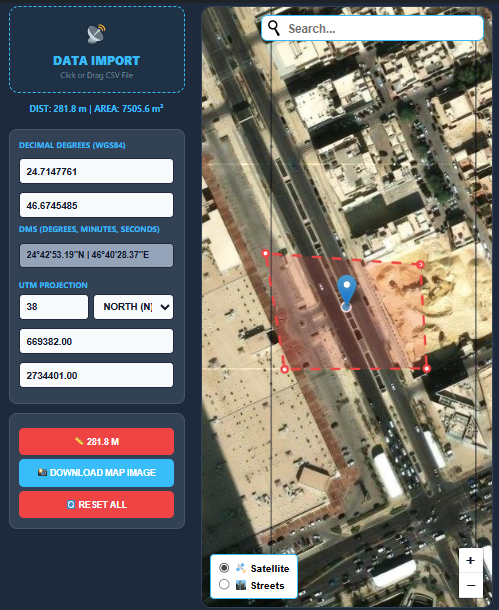
- EPSG Code Support: Perform accurate transformations using official EPSG.io standards, supporting both Global Geographic systems (like WGS84) and Projected systems (like UTM).
- Engineering Precision: Ideal for surveying projects requiring high-accuracy matching with industry-standard ArcGIS and QGIS software.
- Interactive Map: Instant visualization within the Coordinate Converter interface to ensure spatial data integrity before exporting.
- GPS Conversion: Effortlessly convert Latitude/Longitude coordinates to metric (X, Y) and vice versa with a single click.
- Download Map & Coordinate Report: Export a georeferenced map image together with a coordinate report in WGS84, DMS, and UTM formats.
How to Use our Coordinate Converter:
- Select the Source CRS (Coordinate Reference System).
- Enter your values or upload a file, then choose the Target CRS.
- Click Convert to get your high-precision results instantly.
Explore our full suite of Online Map Data Tools to enhance your professional GIS workflow and streamline your spatial data processing.
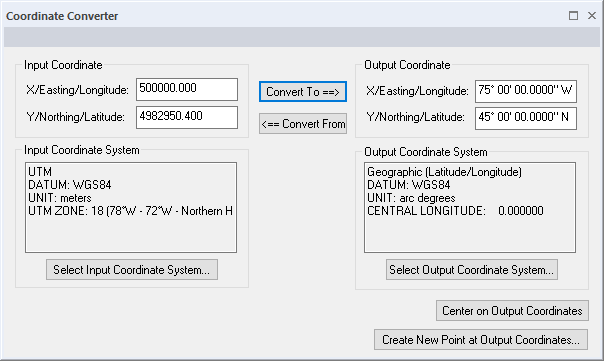
Key Features of GIStract Converter:
- Professional Waypoint Converter: Effortlessly upload and convert GPS waypoints from CSV files for use in any GIS environment.
- NGS Standard Precision: Designed to meet NGS conversion tool requirements, providing accurate matching for ArcGIS, QGIS, and Civil 3D.
- Global Coordinate Reprojection: Convert Latitude and Longitude to Northing and Easting across all UTM zones (including Saudi Arabia zones 36N to 39N).
- No Registration Required: Access all Map Data Tools instantly without an account, ensuring a fast and secure GIS workflow.
Deep Dive: Understanding Coordinate Reference Systems (CRS)
To achieve the best results with the GIStract Coordinate Converter, it is essential to understand the mathematical foundations of spatial data. Most global positioning systems (GPS) provide data in WGS84 (EPSG:4326), which treats the Earth as an ellipsoid. However, for engineering and construction, we often need to project this data onto a flat plane using the Universal Transverse Mercator (UTM) system.
Latitude and Longitude to UTM Converter
Convert geographic coordinates from Latitude and Longitude (WGS84) to UTM Easting and Northing coordinates with automatic UTM zone support. GIStract provides fast and accurate coordinate transformation for GIS, surveying, mapping, and engineering applications worldwide.
UTM to Latitude and Longitude Converter
Convert UTM coordinates back to geographic coordinates (Latitude and Longitude) instantly. GIStract supports all UTM zones and delivers precise coordinate conversion compatible with ArcGIS, QGIS, AutoCAD Civil 3D, and other professional GIS platforms.
Why Convert Latitude and Longitude to Northing and Easting?
Converting Latitude and Longitude to Northing and Easting is essential for transforming ellipsoidal GPS data into a flat, measurable plane. If you are working on a local project in Saudi Arabia, for example, you must convert WGS84 to UTM Zones (36N, 37N, 38N, or 39N). Failure to use precise reprojection parameters can lead to “positional shifts,” risking expensive surveying or construction errors. Our tool utilizes the latest PROJ libraries to ensure every transformation is mathematically sound and industry-standard.
Bulk Data Processing for Professionals
One of the most powerful features of GIStract is the ability to handle large datasets. Instead of manually typing coordinates, users can upload a CSV file. Our engine will parse the columns, apply the selected transformation, and provide a downloadable file ready for import into AutoCAD, Civil 3D, or Global Mapper.
Privacy & Performance: The GIStract Edge
Unlike many online converters that upload your sensitive surveying data to a remote server, GIStract is 100% browser-based.
- Client-Side Processing: Your coordinates never leave your computer. The conversion logic runs entirely in your browser’s memory, ensuring total privacy.
- Zero Latency Performance: Since there is no server-side communication for the math-heavy lifting, the results are instantaneous, even when processing thousands of points.
- Security & Compliance: This approach makes GIStract the ideal choice for government agencies and private sector firms that have strict data security protocols.
Frequently Asked Questions (FAQ)
Q: How do I find the correct UTM zone for my project? A: Use our interactive map to pinpoint your location. The tool is designed to help you identify the appropriate UTM zone based on your geographic longitude, ensuring you select the right projection every time.
Q: Is this tool compatible with high-end GIS software? A: Absolutely. The output formats (GeoJSON and CSV) are fully compatible with ArcGIS Pro, QGIS, and even web-mapping libraries like Mapbox and Leaflet.
Q: Does GIStract support local datum transformations? A: Yes, by utilizing the official EPSG registry, we support hundreds of local datums and projected systems used globally, providing the flexibility needed for international engineering tasks.
“Explore more Map Data Tools on GIStract to enhance your professional GIS workflow and streamline your spatial data processing.”