“GIStract is a professional GeoJSON Editor designed for high-speed performance, allowing you to visualize and edit geospatial data instantly. Whether you are a GIS specialist or a developer, this GeoJSON Editor provides the tools you need to manage spatial data with precision and ease. Welcome to the future of browser-based mapping.”
Table of Contents
- What is a GeoJSON Editor?
- Key Features of GIStract
- Technical Details & RFC 7946 Standard
- Frequently Asked Questions (FAQ)
Key Features و How to use
“GIStract: Professional GeoJSON Editor featuring Live Code-Map Sync. Visualize, draw, and measure spatial data with high-speed performance. Support for KML, CSV, and Shapefiles. Edit and download your work for free—100% private and secure.”
Drag or Click to upload CSV, KML, ZIP or GeoJSON
Key Features of GIStract GeoJSON Editor
- High-Speed Processing: Handle large GeoJSON files with ease and visualize geospatial data instantly on the map.
- Live Editing: Edit attributes and geometries directly within the interface and see changes in real-time.
- Coordinate Conversion: Seamlessly convert coordinates and reproject your spatial data for professional GIS workflows.
- Data Privacy: Your data stays in your browser; GIStract ensures secure and private geospatial data handling.
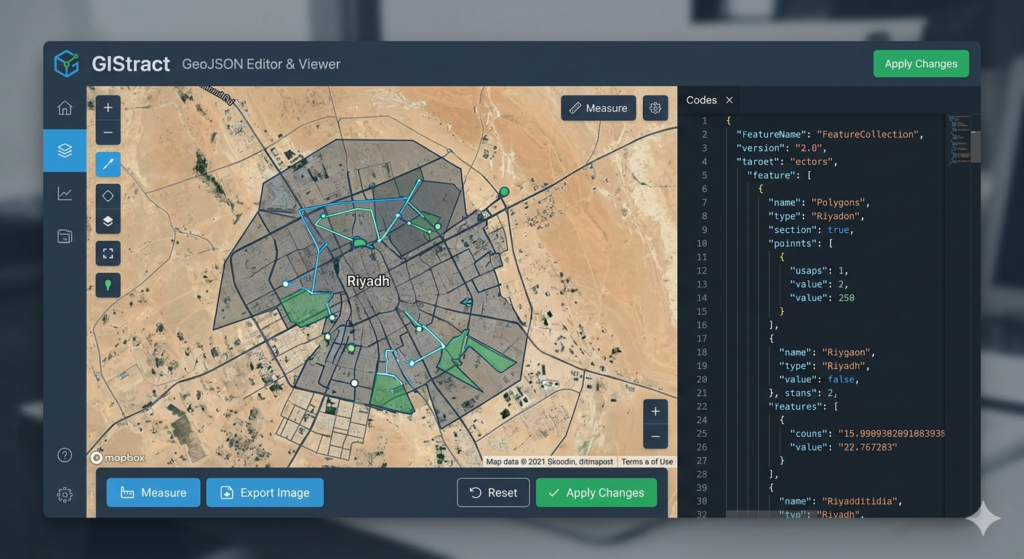
How to use our GeoJSON Viewer and Editor?
- Upload or Paste: Simply drag and drop your file or paste your code into the editor.
- Visualize: View your spatial data on an interactive map with high-speed rendering.
- Edit and Export: Make your changes and download the updated GeoJSON file for your GIS projects.
What is a GeoJSON Editor?
A GeoJSON Editor is a professional tool used by GIS specialists to visualize, modify, and create geospatial data in JSON format. It allows for real-time synchronization between code and map markers.
How to convert KML to GeoJSON?
Simply drag and drop your KML file into the GeoJSON Editor upload zone. Our tool will automatically parse the data and display it on the map, allowing you to export it as a clean GeoJSON file.
Is my spatial data secure?
Yes, GIStract ensures 100% privacy. All processing happens locally in your browser; your sensitive coordinate data is never uploaded to our servers.
Supported Formats: Our GeoJSON Editor supports multiple industry formats including KML, CSV (Lat/Long), and Shapefiles (ZIP).
Coordinate Systems: Seamlessly handle global projections (WGS84) and local grids like UTM Zone 37N and 38N.
Measurement Tools: Built-in tools for calculating distances in meters/kilometers and areas in square meters/hectares directly on the map.
Step 1: Upload your geospatial file or paste your code into the GeoJSON Editor panel.
Step 2: Use the drawing tools to add new points, lines, or polygons.
Step 3: Edit properties and metadata directly in the synchronized code editor.
Step 4: Export your final project as a GeoJSON file or capture a high-resolution map image.
“Using a professional GeoJSON Editor is crucial for modern geospatial workflows in Saudi Arabia. Whether you are working on urban development in Riyadh or environmental modeling in the Qassim region, GIStract provides a streamlined interface to handle complex coordinates. Our tool allows for rapid prototyping of spatial data, enabling engineers to verify their GeoJSON structures before deploying them into large-scale GIS applications. By using this GeoJSON Editor, you save time on manual coding and reduce errors in spatial attribute management.”
“GIStract is designed to support various coordinate reference systems (CRS) commonly used in the Middle East. While WGS84 is the global standard for GeoJSON, our GeoJSON Editor helps users prepare data that can be easily integrated into local planning maps. From mapping residential blocks to large-scale flood hazard zones, the high-speed rendering engine ensures that even dense datasets are visualized without lag. This makes GIStract an essential tool for Saudi consultants and government agencies working with open-source spatial data formats.”
“Unlike other online tools, GIStract focuses on speed and privacy. As a dedicated GeoJSON Editor, we prioritize the user experience by offering a clean, ad-free environment. We understand that spatial data can be sensitive, which is why our ‘Local-Only’ processing is a core feature. You can edit, measure, and export your maps knowing that your professional data never leaves your workstation. Join thousands of GIS specialists who rely on our GeoJSON Editor for their daily spatial data tasks.”
“For more technical details on the GeoJSON standard, you can visit RFC 7946 Official Documentation.”